How to use the online metronome
- Set the tempo with the slider, the − / + buttons, a preset, or the arrow keys (hold Shift for steps of 10).
- Choose a time signature. The first beat of every bar is accented and shown as the larger dot.
- Add a subdivision to hear eighths, triplets or sixteenths between the beats.
- Press Start or the Space bar. Press it again to stop.
Teachers: more ways to use these tools in lessons are on our page for music teachers.
Tempo markings and BPM
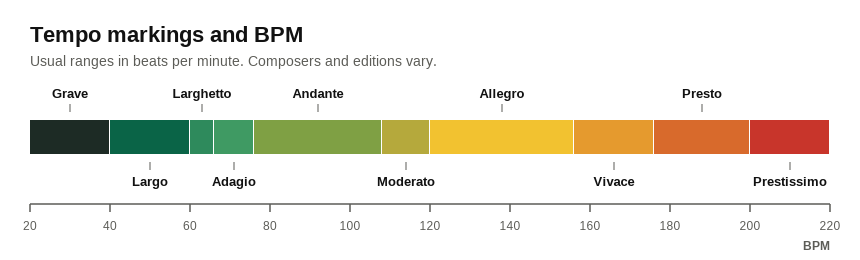
Classical scores give tempo as Italian tempo markings rather than numbers. The readout above shows the marking that matches your BPM. These are the usual ranges; composers and editions vary, so treat them as a guide.
| Marking | Meaning | Approx. BPM |
|---|---|---|
| Grave | Very slow, solemn | below 40 |
| Largo | Broadly, slow | 40–60 |
| Larghetto | Rather broadly | 60–66 |
| Adagio | Slow, at ease | 66–76 |
| Andante | At a walking pace | 76–108 |
| Moderato | Moderately | 108–120 |
| Allegro | Fast, bright | 120–156 |
| Vivace | Lively and fast | 156–176 |
| Presto | Very fast | 176–200 |
| Prestissimo | As fast as possible | above 200 |
Time signatures: 4/4, 3/4, 6/8 and more
The top number of a time signature is how many beats are in a bar; the bottom number is which note value gets the beat (4 = quarter note, 8 = eighth note, 2 = half note).
- 4/4 (common time): four quarter-note beats per bar. Most pop, rock, hip-hop and many classical pieces.
- 3/4: three beats per bar, the feel of a waltz or minuet. Count “1 2 3, 1 2 3”.
- 2/4 and 2/2 (cut time): two beats per bar, used for marches and fast music.
- 6/8: six eighth notes grouped in two sets of three. The metronome accents beats 1 and 4, so you feel two big pulses per bar. Common in jigs, ballads and many folk songs.
- 9/8 and 12/8: three or four groups of three. 12/8 is the classic slow blues shuffle feel.
- 5/4, 7/4, 5/8 and 7/8: odd meters, as in “Take Five” (5/4). Count the groups out loud to lock in.
Subdivisions: eighths, triplets and sixteenths
Subdivisions add quieter clicks between the main beats. They make it much easier to place fast notes evenly and to hear whether you’re rushing. Practise a scale with eighths, then triplets, then sixteenths at the same BPM, and you’ll play two, three and four notes per beat in turn.
Tap tempo: find the BPM of a song
Press Tap tempo (or the T key) along with the beat of a song or a passage you have in your head. After four or more taps the metronome averages the gaps between your taps and sets the BPM. Pause for two seconds to start a new count. It works as a quick, free BPM finder for songs, dance routines and running playlists.
How to practice with a metronome
- Start slow. Pick a tempo where you can play the passage perfectly and relaxed, often 60–70% of the goal.
- Repeat cleanly three to five times before moving up.
- Increase in small steps of 2–5 BPM. The speed trainer can do this for you: for example, add 4 BPM every 4 bars up to 140.
- Back off when it breaks. If mistakes creep in, drop 10 BPM and climb again.
- Turn the accent off sometimes, or set 1/4 so every click is the same, to practise feeling the downbeat yourself.
Typical tempos by style
| Style | Typical BPM |
|---|---|
| Ballads, slow movements | 60–80 |
| Hip-hop | 85–100 |
| Pop and rock | 100–130 |
| House | 120–130 |
| Techno | 125–145 |
| Punk, fast rock | 150–200 |
| Drum and bass | 160–180 |
Frequently asked questions
How do I use an online metronome?
Set the tempo in BPM with the slider, the plus and minus buttons or tap tempo, choose a time signature such as 4/4 or 3/4, and press Start or the Space bar. The first beat of each bar is accented so you can feel where the bar begins.
What BPM should I practice at?
Start at a tempo where you can play the passage perfectly and relaxed, often 60–70% of the target speed. Increase by 2–5 BPM only after several clean repetitions. The speed trainer can raise the tempo automatically every few bars.
How do I set a metronome for 3/4 or 6/8 time?
Choose 3/4 in the time signature menu for waltzes and other music with three beats per bar; the first beat is accented. For 6/8, the metronome clicks six eighth notes per bar with accents on beats 1 and 4, matching the two groups of three you feel in compound time.
How do I find the BPM of a song?
Press Tap tempo (or the T key) in time with the beat of the song, at least four times. The metronome averages your taps and sets the BPM. Start playing to check it lines up with the music.
Is an online metronome accurate?
Yes. This metronome schedules every click on the browser’s audio clock rather than with a regular timer, so the beat stays steady to within a fraction of a millisecond, even if other tabs are busy.
What is a good tempo for beginners?
Most beginners do well between 60 and 80 BPM, which is about one click per second or slightly faster. It is slow enough to think between notes but fast enough to feel a steady pulse.