How to use the online tone generator
- Turn your volume down first, then press Play (or the space bar). Pure tones can sound much louder than music.
- Type a frequency in hertz, try dragging the slider, or tap a preset. The tone changes smoothly in real time while it plays.
- Use ÷2 / ×2 to jump down or up an octave, and ±1 / ±10 for fine adjustments. The closest musical note is shown under the frequency.
- Pick a waveform, set the level with the volume slider, and use Balance to send the tone to the left or right speaker.
- To scan a frequency range, set start and end frequencies and press Start sweep.
Think of it as a Hz generator in your pocket: whether you need a 60 Hz tone for a hum check, 440 Hz for tuning or 40 Hz tones for a bass test, type the number and it plays instantly as a precise hz tone.
Because it runs in your web browser, you can generate pure tones on any device without installing an app. It covers 20 Hz to 20 kHz (and down to 1 Hz), enough to tune instruments, test audio equipment, check a speaker and headphone setup, or run informal hearing tests at home.
The address bar updates as you go (for example ?f=432&w=triangle), so you can bookmark or share an exact frequency tone.
Sine, square, sawtooth and triangle waves
The tone generator offers four classic waveforms: sine, square, sawtooth and triangle waves. They share the same fundamental frequency but sound different because of their harmonics, the extra frequencies stacked above the fundamental.
- Sine: a pure tone containing only one frequency. Smooth and flute-like. Use it for hearing checks, tuning and measurements.
- Square: odd harmonics only (3×, 5×, 7×…) at fairly high levels. Hollow and buzzy, like an old video game or a clarinet.
- Sawtooth: every harmonic (2×, 3×, 4×…). Bright and brassy, the classic synthesizer sound.
- Triangle: odd harmonics that fade quickly. Softer than square, somewhere between sine and square.
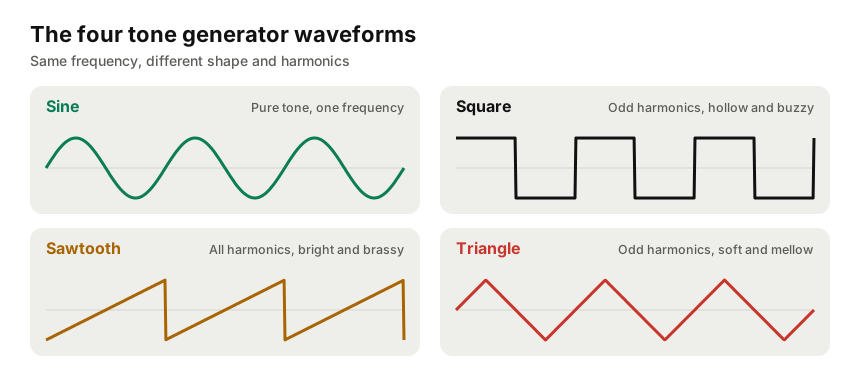
The oscilloscope under the controls shows the actual shape of the wave being played, so you can see the difference as you switch between them.
The frequency range of human hearing
Healthy young ears hear roughly 20 Hz to 20,000 Hz. Frequencies below 20 Hz (infrasound) are generally felt as vibration rather than heard as a tone, and above 20,000 Hz (ultrasound) is beyond human hearing. The upper limit falls with age. Many adults can’t hear above 14,000–16,000 Hz, which is completely normal.
Your equipment matters just as much as your ears. Most phones, tablets and laptop speakers can’t reproduce anything below about 100–200 Hz, so low tones may sound silent on them even though the tone generator is producing them. Headphones and full-range speakers reach much lower. To check what your speakers or headphones can actually reproduce, use our sound test or headphone test.
Common frequencies and what they’re used for
| Frequency | What it is |
|---|---|
| 20 Hz | Lower limit of human hearing; deep subwoofer territory. |
| 40 Hz | Deep bass. 40 Hz tones are also studied in brain research on “gamma” rhythms; that research is ongoing and a tone generator isn’t a treatment. |
| 50 / 60 Hz | Mains electricity hum (50 Hz in Europe and most of Asia, 60 Hz in North America). |
| 100 Hz | Upper bass; a good check for small speakers and laptops. |
| 261.63 Hz | Middle C (C4). |
| 432 Hz | An alternative tuning reference some musicians prefer (A4 = 432 Hz). |
| 440 Hz | A4, the international standard concert pitch for tuning instruments. |
| 528 Hz | Popular in meditation and “solfeggio frequency” playlists. |
| 1,000 Hz | The standard 1 kHz reference test tone used by audio engineers for level calibration. |
| 10,000–15,000 Hz | High treble; useful for a quick check of high-frequency hearing and tweeters. |
What people use a tone generator for
Tuning instruments
Play A4 at 440 Hz (or any reference you need) and tune by ear until the beats between your instrument and the tone disappear. Slow beating means you’re close, and when the beating stops, you’re in tune. For a visual tuner, use our pitch detector.
Testing speakers, headphones and audio equipment
A sound generator is the simplest way to test speakers and headphones: sweep from low to high to find where the bass rolls off, listen for rattles and buzzing at particular frequencies, and use the balance control to confirm the left and right channels. Audio engineers also use test tones to find room resonances, check cables and calibrate levels when testing audio equipment.
Tinnitus frequency matching
Some people with tonal tinnitus use a pure tone generator to estimate their tinnitus pitch: start in the middle of the frequency range and adjust until the tone sounds similar to what you hear. This kind of informal tinnitus frequency matching can be useful to share with a doctor or audiologist, who can carry out proper testing and advise on options such as sound therapy or masking sounds. Always keep the volume low.
Science and education
Tone generators are great for demonstrating resonance, standing waves, beats (play two close frequencies from different devices) and the limits of hearing in the classroom.
Using the frequency sweep
A sweep glides smoothly from one frequency to another. Because it’s logarithmic, it spends as long going from 100 to 200 Hz as from 1,000 to 2,000 Hz, which matches how we hear pitch. Sweep 20–200 Hz slowly to explore your bass response, or 8,000–20,000 Hz to find where your hearing or your tweeters stop. Watch the “Now playing” readout to note the exact frequency where something changes.
Safety tips
- Start with the volume low and raise it slowly. Pure tones are concentrated energy and can be fatiguing.
- Avoid long listening at high frequencies or high volume, especially with headphones.
- Very low frequencies at high volume can damage small speakers. Back off if you hear distortion or rattling.
- Stop immediately if you feel discomfort, ringing or pain.
Frequently asked questions
What frequencies can the tone generator play?
Any frequency from 1 Hz to 20,000 Hz, in steps as fine as 0.1 Hz below 100 Hz. Whether you can hear the extremes depends on your speakers or headphones and your hearing: most phone and laptop speakers can’t reproduce deep bass, and frequencies below 20 Hz are generally felt rather than heard.
Which waveform should I use?
Use a sine wave for a pure tone with a single frequency, which is best for hearing checks, tuning and testing audio equipment. Square, sawtooth and triangle waves add harmonics, so they sound buzzier and are easier to hear on small speakers.
Can I use this tone generator for tinnitus frequency matching?
Some people use a pure tone generator to estimate the pitch of their tinnitus by adjusting the frequency until it sounds similar. Keep the volume low, and treat the result as informal. An audiologist can do proper tinnitus pitch matching and advise on sound therapy.
Is the tone generator safe for my ears and speakers?
Start at a low volume and increase gradually. Pure tones, especially high frequencies, can be uncomfortable or harmful at high levels, and very low or very loud tones can strain small speakers. Stop if you feel discomfort.
Does it work on phones and tablets?
Yes. It works in Safari on iPhone and iPad and in Chrome on Android. On iPhone, make sure the silent switch is off, since some browsers mute web audio in silent mode.
Can I share a specific frequency?
Yes. The page address updates as you change the frequency and waveform, for example ?f=432&w=triangle. Copy the URL to share or bookmark that exact tone.